
WhatsApp connection is separate from Facebook. Path: WhatsApp Tools → Connect, then either Embedded Signup or Manual Credentials.
Open Connect from the sidebar
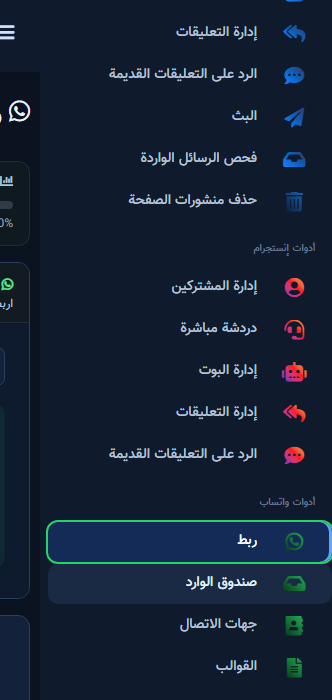
- Expand WhatsApp Tools in the sidebar.
- Click Connect (green WhatsApp icon).
- Confirm both Embedded Signup and Manual Credentials tabs appear.
- Use one tab per attempt — mixing methods saves incomplete data.
Embedded Signup (recommended)
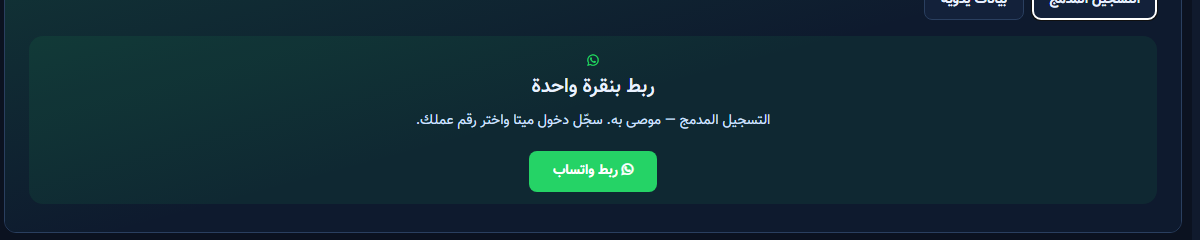
- Open Embedded Signup until the one-click card appears.
- Click the green Connect WhatsApp button.
- Finish Meta’s window with the correct business, WABA, and number.
- Back in ChatLik, confirm the number shows connected, then enable the bot.
Manual credentials — field by field
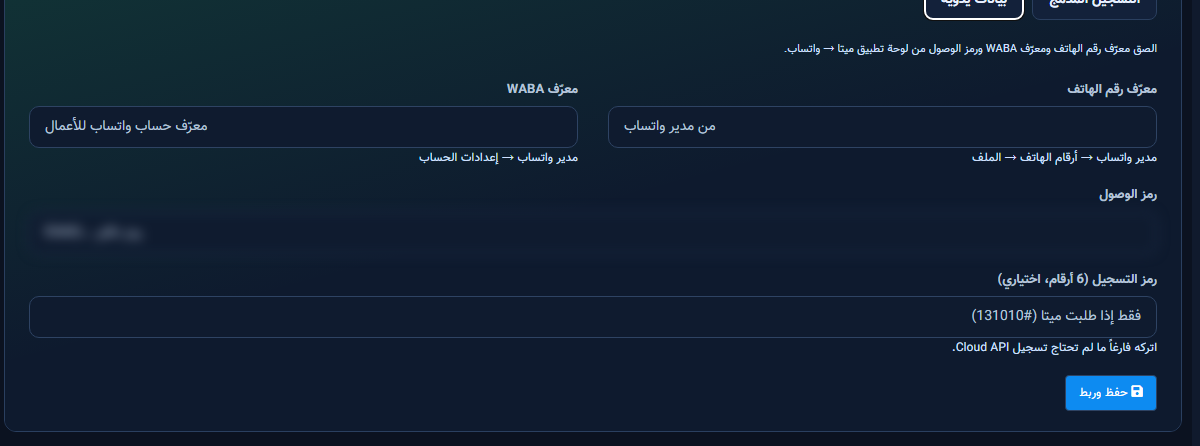
- Paste Phone Number ID from WhatsApp Manager → Phone numbers → Profile.
- Paste WABA ID from WhatsApp Manager → Account settings.
- Paste the Access Token from your Meta app — blurred in screenshots.
- Registration code (6 digits) is optional unless Meta asks (#131010).
- Click Save & Connect and wait for success before leaving.
Deep dive: Embedded Signup guide.


